24/7 Support : info@razorse.com | WhatsApp : +91-7011221090

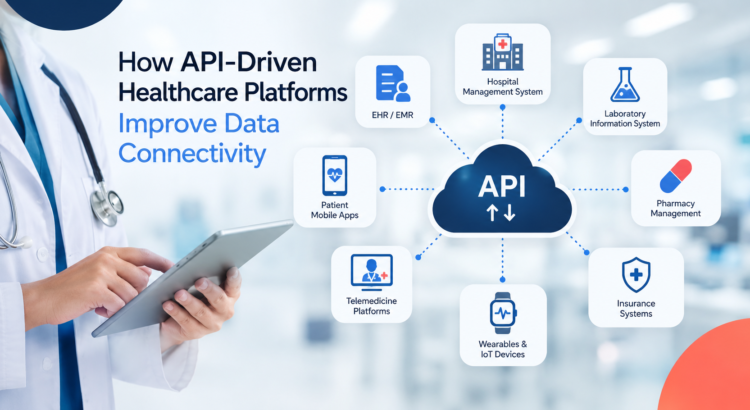
API-driven healthcare platform connecting EHR, hospital, laboratory, pharmacy, telemedicine, insurance, and IoT systems for seamless data connectivity.

How API-Driven Healthcare Platforms Improve Data Connectivity

How API-Driven Healthcare Platforms Improve Data Connectivity

Healthcare is becoming increasingly digital, but one major challenge continues to slow down transformation: API-Driven data connectivity.

Hospitals, clinics, diagnostic laboratories, pharmacies, insurance providers, and healthcare applications often rely on different software systems. When these systems cannot communicate effectively, healthcare data becomes fragmented, making it harder for organizations to access the right information at the right time.

This is where API-driven healthcare platforms can make a significant difference.

By enabling different applications and systems to securely exchange data, APIs can create a more connected healthcare ecosystem, improve interoperability, and help organizations build scalable digital healthcare solutions.

What Is an API-Driven Healthcare Platform?

An API, or Application Programming Interface, allows different software applications to communicate with each other.

In healthcare, APIs can connect systems such as:

  • Electronic Health Records (EHR)
  • Electronic Medical Records (EMR)
  • Hospital Management Systems
  • Laboratory Information Systems
  • Pharmacy Management Software
  • Healthcare mobile applications
  • Telemedicine platforms
  • Insurance systems
  • Medical devices and IoT platforms

Instead of keeping healthcare information isolated within individual systems, an API-driven healthcare platform creates a framework through which authorized systems can securely exchange relevant information.

This makes APIs an important part of healthcare software development and digital transformation.

Why API-Driven Data Connectivity Matters in Healthcare

Healthcare generates enormous amounts of data every day. Patient information, laboratory results, prescriptions, medical histories, appointments, billing records, and diagnostic information may all exist across different platforms.

Without effective connectivity, organizations can face:

  • Data silos
  • Duplicate data entry
  • Delayed access to information
  • Manual processes
  • Inconsistent patient records
  • Integration challenges
  • Poor coordination between departments

For healthcare providers, these challenges can affect operational efficiency and the overall digital experience for patients and healthcare professionals.

Healthcare interoperability helps address this problem by allowing different systems to exchange and understand information more effectively.

1. Connecting Multiple Healthcare Systems

One of the biggest advantages of API-driven architecture is its ability to connect different healthcare applications.

For example, a hospital may use separate systems for patient management, diagnostics, pharmacy operations, billing, and appointments.

APIs can act as the communication layer between these systems, allowing relevant information to move between applications without requiring organizations to completely replace their existing infrastructure.

This makes healthcare system integration more practical and scalable.

2. Improving Healthcare Interoperability

Interoperability is becoming increasingly important as healthcare organizations adopt more digital technologies.

An interoperable healthcare environment allows different systems to exchange information in a structured and meaningful way.

Modern healthcare APIs can support integration with standards and frameworks such as HL7 and FHIR, helping healthcare applications communicate more consistently.

For organizations building modern healthcare platforms, following appropriate interoperability standards can make it easier to connect with existing systems and future technologies.

3. Reducing Manual Data Entry

Manual data entry is time-consuming and can introduce avoidable errors.

Consider a patient’s diagnostic report being generated in a laboratory system and then manually entered into another healthcare application.

With appropriate API integration, information can move automatically between connected systems based on defined workflows and permissions.

This can help reduce repetitive administrative work while allowing healthcare professionals to spend more time on higher-value tasks.

4. Enabling Real-Time Data Exchange

Healthcare decisions often depend on timely information.

API-based systems can facilitate near-real-time exchange of relevant information between connected applications.

For example, when a patient’s information is updated in one authorized system, another connected application can retrieve the latest available information through an API.

This can support faster workflows across hospitals, clinics, laboratories, pharmacies, and other healthcare environments.

5. Supporting Telemedicine and Digital Health

The growth of telemedicine and digital health applications has increased the need for reliable healthcare data integration.

A telemedicine platform may need to interact with patient records, appointment systems, payment platforms, diagnostic services, and other applications.

An API-first healthcare architecture can make these integrations easier to develop and maintain.

This allows businesses to build digital healthcare solutions that can connect with existing infrastructure rather than operating as isolated applications.

6. Making Healthcare Platforms More Scalable

Healthcare organizations are continuously adopting new technologies.

A platform that works today may need to integrate with new applications, devices, AI solutions, or third-party services tomorrow.

This is where scalable healthcare software architecture becomes important.

With an API-driven approach, organizations can add or modify integrations without necessarily rebuilding the entire application.

This flexibility can help businesses develop healthcare platforms that are better prepared for evolving technology requirements.

7. Connecting Healthcare With AI and IoT

The future of healthcare is not limited to traditional software systems.

AI, machine learning, wearable devices, remote monitoring systems, and healthcare IoT are generating new sources of healthcare data.

APIs can provide the connectivity layer needed to bring these technologies into existing digital ecosystems.

For example, an API-enabled platform could potentially connect data from authorized wearable or monitoring devices with healthcare applications, allowing relevant information to be accessed and analyzed within connected workflows.

Combined with AI in healthcare, this connectivity can open opportunities for predictive analytics, automation, personalized services, and more intelligent decision-making.

Security and Privacy Are Critical

Healthcare data is highly sensitive, which means connectivity cannot come at the expense of security.

A robust healthcare API integration strategy should consider authentication, authorization, encryption, access controls, monitoring, and regulatory requirements from the beginning.

Organizations should also ensure that users and systems can access only the information they are authorized to access.

Security should therefore be treated as a core component of healthcare software architecture not something added after integration is complete.

The Future of API-Driven Healthcare

Healthcare is moving toward a more connected digital ecosystem.

As hospitals, clinics, diagnostic centers, insurers, health-tech companies, and patients increasingly rely on digital platforms, the ability to securely exchange information will become even more important.

API-driven healthcare platforms provide the foundation for connecting applications, improving interoperability, supporting digital health services, and integrating emerging technologies such as AI and IoT.

For organizations planning a digital transformation initiative, the objective should not simply be to connect two applications. It should be to build a scalable, secure, and interoperable healthcare technology ecosystem that can adapt as the organization grows.

With the right architecture and integration strategy, APIs can turn disconnected healthcare systems into a more connected digital infrastructure.


How to Optimize CMS Performance for High-Traffic Websites

A website that loads slowly can instantly turn away visitors, hurt conversions, and even impact search rankings. When traffic scales up -whether from marketing campaigns, seasonal spikes, or business growth -even small inefficiencies in your CMS (Content Management System) can lead to sluggish performance. Optimizing your CMS for high-traffic websites ensures stability, speed, and scalability -the three key ingredients of a seamless digital experience.

Here are some practical ways to improve your CMS performance and keep your website running smoothly, even when the traffic shoots up. 

1. Choose the Right Hosting Environment

Your CMS is only as good as the server it runs on. Shared hosting might be affordable but often lacks the resources to handle large traffic surges. Instead, consider:

  • Dedicated or VPS Hosting: Offers isolated resources that guarantee performance.
  • Cloud Hosting (AWS, Azure, GCP): Enables auto-scaling so your site adapts to sudden spikes in visitors.
  • CDN Integration: A Content Delivery Network distributes your content across multiple servers worldwide, reducing latency and improving global load times.

For high-traffic sites, pairing your CMS with a cloud-based, load-balanced hosting infrastructure is the most efficient solution.

2. Enable Caching at Every Level

Caching is the backbone of high-performance CMS systems. It minimizes the need to regenerate content dynamically for every request. There are multiple layers of caching you can implement:

  • Page Caching: Saves entire HTML pages, making them instantly available for repeat visitors.
  • Object Caching: Stores frequently used database queries or code objects in memory.
  • Browser Caching: Allows users’ browsers to store static assets (like CSS, JS, and images), reducing repeat load times.

CMS platforms like WordPress, Drupal, and Joomla offer excellent caching plugins or modules (like WP Super Cache, W3 Total Cache, or Varnish integration) that can be configured easily.

3. Optimize Your Database

As your website scales, the database can become a bottleneck if not maintained properly. Here are some ways to keep it lean and fast:

  • Regular Cleanup: Remove old revisions, spam comments, and unused metadata.
  • Indexing: Ensure frequently queried columns are properly indexed for faster lookup.
  • Use a Separate Database Server: For large-scale sites, isolating the database improves both security and performance.
  • Query Optimization: Analyze slow queries using tools like MySQL’s slow query log and optimize them for efficiency.

Databases that are well-structured and regularly maintained can handle millions of requests without choking under pressure.

4. Compress and Optimize Media Files

Heavy images and videos are among the biggest culprits of slow load times. To fix this:

  • Compress images using tools like TinyPNG or CMS plugins that automate compression.
  • Use next-gen image formats like WebP for superior compression without quality loss.
  • Implement lazy loading so images load only when a user scrolls to them.
  • Host large video files on external platforms (like YouTube or Vimeo) and embed them rather than hosting locally.

Optimized media can dramatically improve load times without compromising the visual appeal of your site.

5. Use a Content Delivery Network (CDN)

A CDN caches your static assets (HTML, CSS, JavaScript, images, etc.) across multiple servers worldwide. When a user visits your website, the content is served from the closest geographical location -cutting down on latency.

Popular CDNs like Cloudflare, Akamai, or Amazon CloudFront also protect against DDoS attacks and provide performance analytics. Integrating a CDN with your CMS ensures your website performs consistently, regardless of where your visitors come from.

6. Minify CSS, JavaScript, and HTML

Every extra space, comment, or line in your code adds to file size. By minifying these files, you reduce load time significantly:

  • Combine multiple CSS and JS files into single bundles.
  • Use CMS plugins (like Autoptimize or Fast Velocity Minify) to automate this process.
  • Defer non-essential JavaScript to prevent it from blocking page rendering.

This simple optimization step can shave precious milliseconds off your page load speed -which can make a big difference for users on slower connections.

7. Implement Load Balancing

High-traffic websites often face uneven distribution of requests. Load balancers help by distributing incoming requests evenly across multiple servers.
This not only ensures that no single server gets overwhelmed but also provides redundancy -if one server fails, another picks up automatically.
Cloud platforms make it easy to implement load balancing with minimal configuration and maximum uptime.

8. Monitor Performance Continuously

Optimizing once isn’t enough. Continuous monitoring helps detect new bottlenecks as your site evolves.
Use tools like:

  • Google PageSpeed Insights for page-level recommendations.
  • GTmetrix or Pingdom for detailed performance reports.
  • New Relic or Datadog for server-level and application performance monitoring.

Tracking these metrics ensures you can address issues proactively before they affect user experience.

9. Update Regularly but Cautiously

CMS updates often include performance and security improvements, so keeping your system and plugins up to date is vital. However, major updates can occasionally cause compatibility issues.
Always test updates in a staging environment before applying them to the live site. This balance between innovation and stability is crucial for high-traffic sites.

10. Optimize Your CMS Theme and Plugins

Not all themes and plugins are built with performance in mind. A bloated theme or outdated plugin can slow down the entire site.

  • Use lightweight themes that focus on speed and efficiency.
  • Deactivate and delete any plugins not in use.
  • Choose plugins from trusted developers that are updated regularly.

Every plugin you add introduces code that affects loading time -so quality always beats quantity.

Conclusion

A high-performing CMS isn’t built overnight. It’s the result of ongoing optimization, testing, and tuning. By combining the right hosting environment, caching, CDN, optimized media, and smart coding practices, your website can deliver a seamless experience even during massive traffic surges.

At Razorse Software, we specialize in developing high-performance, scalable, and SEO-optimized CMS solutions that help brands handle traffic spikes effortlessly. Whether you’re running a corporate portal or a large e-commerce platform, our team ensures your digital experience stays fast, reliable, and secure -every time.

#RazorseSoftware #CMSOptimization #WebsitePerformance #WebDevelopment #DigitalTransformation

Securing Your PHP Application: Common Vulnerabilities & Fixes

PHP remains one of the most popular server-side scripting languages, powering millions of websites and web applications globally. Its ease of use and flexibility have contributed to its widespread adoption. However, this popularity has also made PHP applications a frequent target for cyberattacks. From small businesses to enterprise-level platforms, vulnerabilities in PHP code can result in data breaches, loss of customer trust, and even legal consequences. As a result, securing PHP applications should be a top priority for developers and organizations alike.

One of the most common vulnerabilities affecting PHP applications is SQL Injection. This occurs when user input is directly passed into SQL queries without adequate sanitization, allowing attackers to manipulate database commands. For example, an attacker could bypass login pages or extract sensitive data simply by injecting malicious SQL statements. To prevent this, developers must use prepared statements and parameterized queries provided by PDO or MySQLi, which ensure user inputs are handled safely and separated from the query logic.

Another prevalent issue is Cross-Site Scripting (XSS), which allows attackers to inject malicious JavaScript code into web pages viewed by other users. This can lead to stolen cookies, session hijacking, or unwanted actions performed on behalf of the victim. Protecting against XSS involves sanitizing all user input before displaying it on a webpage. Functions like htmlspecialchars() can encode characters to neutralize harmful scripts. Additionally, implementing a Content Security Policy (CSP) adds an extra layer of defence by restricting the execution of unauthorized scripts.

Cross-Site Request Forgery (CSRF) is a silent but dangerous attack that tricks authenticated users into performing actions they did not intend, such as changing account settings or initiating transactions. This typically occurs when forms or links are exploited without verifying the origin of the request. The fix involves implementing CSRF tokens—unique, unpredictable values stored in the user’s session and verified on every request. Only legitimate interactions from your website will carry the correct token, making unauthorized requests invalid.

Remote Code Execution (RCE) is another critical vulnerability, often stemming from insecure use of functions like eval(), exec(), or include() with unsanitized input. Attackers can execute arbitrary code on your server if these functions are not used cautiously. Developers should avoid these functions altogether or use strict input validation and whitelisting when dynamic functionality is required. Never include files based directly on user input without thorough checks.

File upload features can be incredibly useful but also dangerous if not implemented securely. If users can upload files without proper validation, an attacker might upload a malicious PHP script disguised as an image or document. This could allow them to gain control of the server or steal sensitive data. To mitigate this risk, always validate file types and extensions, store files outside the web root, rename them to remove user-defined names, and restrict access through .htaccess or other server-side rules.

Session hijacking is another method used by attackers to impersonate valid users by stealing or guessing session identifiers. This can occur through network sniffing, XSS, or session fixation. To reduce the risk, always enforce HTTPS to encrypt data in transit, regenerate session IDs upon login or privilege changes using session_regenerate_id(), and configure session cookies with HTTP Only, Secure, and SameSite flags. These simple tweaks can dramatically enhance session security.

Exposing detailed error messages can be a goldmine for attackers looking to understand your application’s structure. Error messages that reveal file paths, database schema, or server configuration can be used to craft targeted attacks. In a production environment, it’s essential to turn off error displays and log them privately for developer access. The end users should see generic messages that don’t reveal any internal workings.

Beyond code-level vulnerabilities, misconfigurations at the server or PHP level can also pose significant security risks. For example, directives like allow_url_include or display_errors should be disabled in the production environment to reduce exposure. PHP configuration should be regularly reviewed, and default settings should be hardened based on your application needs. Additionally, ensuring that your PHP version and third-party packages are up to date helps patch known vulnerabilities before they can be exploited.

Security headers offer an additional layer of protection and are easy to implement. Headers like X-Frame-Options, Strict-Transport-Security, and Content-Security-Policy help prevent clickjacking, force HTTPS usage, and restrict script execution. These can be set in your .htaccess file or directly in your PHP code using the header() function. While not a silver bullet, security headers complement your core application defences.

At the end of the day, securing a PHP application isn’t a one-time task. It requires continuous vigilance, regular code reviews, penetration testing, and an ongoing commitment to best practices. As cyber threats grow in sophistication, your defence mechanisms must evolve too. By being proactive and incorporating secure coding practices from the start, you can significantly reduce your application’s attack surface.

At Razorse Software, we prioritize security in every line of code. Our team stays updated with the latest security standards to ensure that your PHP applications are robust, scalable, and resilient against modern threats. If you’re developing or maintaining a PHP project and want to ensure its protected, our experts are here to help.

#PHPDevelopment #Cybersecurity #SecureCoding #WebApplicationSecurity #PHPVulnerabilities #WebDevTips #SecurePHP #RazorseSoftware #TechSolutions #PHPFixes #WebSecurityBestPractices

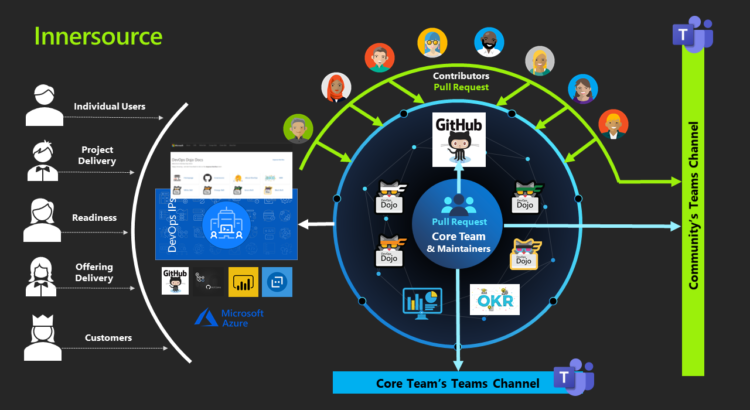
Creating a Learning Dojo: A Smart Move for Team Development

In today’s fast-paced digital landscape, the only constant is change. For companies striving to stay competitive and innovative, continuous learning is no longer a luxury – it’s a necessity. One of the most effective ways to nurture a culture of growth and upskilling within teams is by establishing a Learning Dojo. Inspired by the traditional Japanese concept of a “dojo – a space for immersive learning and disciplined practice – a Learning Dojo is a structured yet flexible environment designed to enhance skill development, collaboration, and innovation.

What is a Learning Dojo?

A Learning Dojo is not just a training room or an occasional workshop. It’s a dedicated ecosystem where team members can explore new technologies, solve real-world problems, share knowledge, and practice critical thinking in a risk-free, collaborative space. Unlike traditional training sessions, which often feel like a one-off chore, a dojo encourages continuous engagement and experimentation.

Learning Dojos can be customized to focus on various disciplines such as coding, design thinking, cybersecurity, DevOps, AI/ML, or product management. The objective is to cultivate a hands-on learning culture where employees not only gain technical proficiency but also improve soft skills like communication, teamwork, and adaptability.

Why Teams Need a Learning Dojo

  1. Bridges the Skills Gap: With the rapid evolution of technology, it’s common for teams to fall behind in adopting the latest tools and practices. A Learning Dojo serves as a bridge between current capabilities and desired skill sets.
  2. Promotes Cross-Functional Learning: In most organizations, knowledge tends to be siloed. A Learning Dojo encourages cross-pollination of ideas between departments, allowing, for instance, developers to understand UI/UX principles or marketers to grasp data analytics.
  3. Improves Team Collaboration: Learning Dojos provide a neutral ground for team members to work together on challenges outside of daily project constraints. This boosts trust, understanding, and collaboration within the team.
  4. Enhances Problem-Solving Abilities: Rather than sticking to textbooks or theory, a dojo challenges participants to apply their knowledge in real or simulated scenarios, sharpening their analytical and decision-making skills.
  5. Drives Innovation: When people are given the freedom and tools to experiment, they often come up with fresh ideas that can be transformed into innovative products or solutions.

Setting Up a Learning Dojo: Key Steps

1. Define Clear Objectives

Before setting up a dojo, identify what you aim to achieve. Is it to improve code quality? Foster leadership skills? Introduce cloud technologies? A clear vision will help in creating a focused curriculum and structure.

2. Choose the Right Format

Dojo formats can vary—some are short-term (like weekly sessions), while others are ongoing environments open to any employee. You can organize coding katas, design sprints, hackathons, mentorship circles, or knowledge-sharing seminars depending on your goals.

3. Create a Safe Environment

A key principle of a dojo is psychological safety. Participants should feel free to ask questions, make mistakes, and try unconventional approaches without fear of judgment. This openness leads to deeper learning and stronger bonds.

4. Involve Coaches and Mentors

Experienced team members or external experts can act as facilitators, guiding the dojo sessions and offering feedback. Their role is not to teach in a top-down manner but to inspire, coach, and support learners on their journey.

5. Integrate Real-World Projects

Instead of abstract exercises, incorporate real business problems or user stories that need solving. This not only makes learning relevant but also contributes directly to your organization’s goals.

6. Measure Impact and Iterate

Track metrics like employee satisfaction, knowledge retention, project outcomes, or reduced error rates post-dojo implementation. Use this data to refine the process, topics, and methods to make the dojo more effective.

Real-World Applications of Learning Dojos

Leading tech firms like Google, Spotify, and IBM have already adopted versions of Learning Dojos to enhance team agility and innovation. At Google, “Engineering Practicum” and “Code Labs” mirror dojo principles, fostering mentorship and hands-on experience. Similarly, at Spotify, teams engage in “Hack Weeks” where learning and experimentation are encouraged in a dojo-like environment.

Even smaller organizations and startups are embracing the dojo model to upskill employees quickly and cost-effectively, often replacing traditional classroom training with interactive, peer-led sessions.

The Psychological Edge

Beyond skill development, Learning Dojos fulfil an important psychological need – the desire for mastery. When employees feel that their organization invests in their growth, it boosts morale, loyalty, and motivation. In an era of high attrition and burnout, this cultural shift toward continuous learning could be your secret weapon in retaining top talent.

Final Thoughts

Creating a Learning Dojo isn’t just about providing training – it’s about fostering a mindset of curiosity, collaboration, and continuous improvement. As teams become more diverse and distributed, having a central hub where learning is encouraged and celebrated can drive long-term success across all verticals.

At Razorse Software, we recognize that innovation stems from knowledge and practice. That’s why we actively promote a learning culture through internal workshops, real-world projects, and collaborative problem-solving spaces. A Learning Dojo isn’t just a smart move – it’s a strategic investment in the future of your team.

#LearningDojo #TeamDevelopment #ContinuousLearning #RazorseSoftware #WorkplaceInnovation #Upskilling #SmartTeams #AgileLearning #FutureOfWork #EmployeeGrowth

Enhancing Customer Service with AI Chatbots

In today’s fast-paced digital world, customer expectations are higher than ever. They demand instant responses, personalized interactions, and seamless experiences across platforms. For businesses striving to meet these demands, artificial intelligence (AI) chatbots have emerged as a transformative solution. These virtual assistants not only enhance customer service but also streamline operations, reduce costs, and improve overall efficiency.

The Role of AI in Customer Service

AI chatbots are powered by natural language processing (NLP) and machine learning (ML) technologies, enabling them to understand and respond to human queries in real time. Unlike traditional customer service methods, which often rely on human agents, AI chatbots can handle multiple interactions simultaneously, ensuring 24/7 availability.

Key benefits include:

  • Instant Responses: Chatbots provide immediate answers, eliminating customer wait times.
  • Cost-Effectiveness: By automating routine inquiries, businesses can reduce the workload on customer support teams and lower operational costs.
  • Scalability: Chatbots can manage an unlimited number of customer queries without compromising quality.
  • Data Insights: AI chatbots collect and analyze customer interactions, providing businesses with valuable insights to improve their services.

Personalization at Scale

One of the standout features of AI chatbots is their ability to deliver personalized experiences. By leveraging customer data, such as purchase history and preferences, chatbots can tailor responses to meet individual needs. For example, an eCommerce chatbot can suggest products based on a customer’s browsing history, enhancing the likelihood of a sale.

Moreover, advanced AI chatbots can adapt their tone and language based on the customer’s mood and context, creating a more human-like interaction. This level of personalization fosters trust and strengthens customer relationships, which are crucial for long-term business success.

Use Cases Across Industries

AI chatbots are revolutionizing customer service across various industries:

  1. eCommerce: From answering product queries to processing orders and handling returns, chatbots streamline the online shopping experience.
  2. Healthcare: Virtual assistants can provide appointment scheduling, symptom checking, and post-care follow-ups, ensuring patients receive timely support.
  3. Banking and Finance: AI-powered bots assist with account management, fraud detection, and financial advice, making banking more accessible.
  4. Travel and Hospitality: Chatbots enhance travel planning by providing instant information on bookings, itineraries, and local attractions.
  5. Education: Virtual tutors and administrative chatbots help students with enrolment, course selection, and academic queries.

Overcoming Challenges with AI Chatbots

While the benefits of AI chatbots are undeniable, businesses must address certain challenges to maximize their potential:

  • Language Barriers: Chatbots must support multiple languages to cater to a global audience effectively.
  • Complex Queries: Handling intricate or sensitive issues may require integration with human agents for seamless resolution.
  • Data Security: Protecting customer information is paramount, and businesses must ensure that their chatbots comply with privacy regulations.

To overcome these challenges, businesses should invest in continuous training and updates for their chatbots, ensuring they remain effective and secure over time.

The Future of AI Chatbots in Customer Service

The future of customer service is being shaped by the rapid advancements in AI chatbot technology. As AI continues to evolve, chatbots are becoming smarter, more intuitive, and capable of delivering experiences that closely mimic human interactions. With the integration of voice recognition, sentiment analysis, and predictive analytics, chatbots are no longer limited to answering basic queries, they are transforming into proactive, empathetic virtual assistants.

Imagine a chatbot that not only resolves your customers’ current issues but also anticipates their future needs based on past interactions. For instance, it could remind a customer to renew their subscription or suggest additional services they might find valuable. This proactive approach helps businesses build stronger relationships and foster customer loyalty.

The inclusion of multilingual capabilities is another game-changer, enabling businesses to cater to a global audience without barriers. Additionally, AI-powered bots are increasingly integrating with emerging technologies like augmented reality (AR) and the Internet of Things (IoT), enhancing customer experiences across diverse platforms.

In the years ahead, AI chatbots will become an integral part of business strategies, offering unparalleled support, improving operational efficiency, and empowering businesses to deliver exceptional customer experiences effortlessly.

Let Razorse Software Help You Transform Customer Service with AI

At Razorse Software, we’re passionate about helping businesses redefine customer service with cutting-edge AI solutions. Our AI-powered chatbots aren’t just tools; they’re your round-the-clock support agents, capable of delivering fast, personalized, and seamless experiences that your customers will love.

Whether you’re looking to reduce wait times, handle more queries, or create meaningful interactions, we’ve got you covered. With our tailored approach, we’ll work closely with you to design a solution that fits your unique needs and goals.

Ready to elevate your customer service? Get in touch with Razorse Software today, and let’s build something amazing together!

Essential Security Measures for eCommerce Websites

The success of eCommerce platforms hinges not just on seamless shopping experiences but on creating a digital fortress that safeguards every transaction and interaction. Security breaches not only damage a brand’s reputation but can also result in substantial financial losses. For eCommerce platforms, implementing robust security measures is not just a regulatory requirement – it is a commitment to protecting sensitive customer information and ensuring a seamless shopping experience.

1. SSL Certificates: The First Line of Defence

One of the most fundamental security measures for any eCommerce website is the implementation of Secure Socket Layer (SSL) certificates. SSL encrypts data transmitted between the user’s browser and the web server, preventing unauthorized access. Websites with SSL certificates display a padlock icon in the browser’s address bar and use “https://” in their URL, signalling to users that their information is secure.

SSL is essential for protecting sensitive customer data such as credit card details, login credentials, and personal information during transactions. Moreover, search engines like Google prioritize HTTPS-enabled sites, providing an additional SEO boost.

2. Secure Payment Gateways

Partnering with trusted and secure payment gateways is critical for protecting financial transactions. Payment gateways like PayPal, Stripe, and Razorpay employ robust encryption technologies and fraud detection mechanisms. Furthermore, eCommerce platforms should ensure PCI DSS (Payment Card Industry Data Security Standard) compliance to secure cardholder data and build customer trust.

3. Multi-Factor Authentication (MFA)

Multi-factor authentication adds an extra layer of security by requiring users to verify their identity through additional steps, such as entering a one-time password (OTP) or using biometric verification. Implementing MFA for admin panels, vendor accounts, and customer logins significantly reduces the risk of unauthorized access, even if login credentials are compromised.

4. Data Encryption and Secure Storage

Sensitive customer data, such as passwords, payment details, and personal information, must be encrypted and stored securely. Use hashing algorithms like bcrypt or Argon2 for passwords and ensure regular updates to encryption protocols to keep up with evolving threats. Avoid storing unnecessary data and follow the principle of minimal data retention to reduce potential risks.

5. Regular Security Audits and Vulnerability Scans

Regular security audits and vulnerability scans are crucial to identifying and addressing potential weaknesses in your eCommerce platform. Use tools like OWASP ZAP or Nessus to conduct scans and address vulnerabilities promptly. Collaborating with cybersecurity experts can also help in simulating real-world attack scenarios to ensure your systems are robust against threats.

6. Firewalls and Web Application Firewalls (WAFs)

Firewalls are a fundamental defence mechanism against cyber threats. Web Application Firewalls (WAFs) specifically protect eCommerce websites from application-layer attacks like SQL injection, cross-site scripting (XSS), and denial-of-service (DoS) attacks. A WAF monitors incoming traffic and filters out malicious requests, ensuring legitimate users can access your website seamlessly.

7. Implementing a Content Security Policy (CSP)

A Content Security Policy (CSP) helps prevent code injection attacks by controlling the resources a website can load. By specifying trusted sources for scripts, styles, and other resources, a CSP minimizes the risk of cross-site scripting (XSS) attacks and data breaches.

8. User Education and Security Awareness

Educating customers about potential phishing scams, safe password practices, and recognizing secure websites empowers them to navigate your platform safely. Regularly update your users about security measures and encourage them to report suspicious activities. A well-informed user base is less likely to fall victim to cyber threats.

9. Backup and Recovery Plans

No security measure is entirely foolproof. A comprehensive backup and recovery plan ensures business continuity in the event of a cyberattack or data breach. Store backups in secure locations, both on-site and off-site, and test recovery procedures regularly to ensure swift data restoration with minimal downtime.

10. Monitoring and Incident Response

Continuous monitoring of your eCommerce platform allows you to detect and respond to suspicious activities in real time. Use advanced monitoring tools and log analysis to identify anomalies. Additionally, having a well-defined incident response plan ensures swift action to mitigate the impact of security breaches and restore operations efficiently.

11. Complying with Data Protection Regulations

Adherence to data protection laws like GDPR (General Data Protection Regulation) and CCPA (California Consumer Privacy Act) is critical for protecting customer data and avoiding legal penalties. Regularly update your privacy policies and ensure compliance with these regulations to build trust with your customers.

Building a Secure Future for eCommerce

At Razorse Software, we understand that security is the backbone of a successful eCommerce platform. By integrating cutting-edge security technologies and best practices, we help businesses build secure, scalable, and user-friendly eCommerce solutions. From SSL implementation to real-time threat monitoring, our expertise ensures your platform is fortified against modern cyber threats.

Take the first step toward securing your eCommerce venture with Razorse Software!

#eCommerceSecurity #CyberSecurity #SSL #SecurePayments #WAF #DataProtection #RazorseSoftware