24/7 Support : info@razorse.com | WhatsApp : +91-7011221090

Digital Twins and AR: Redefining Industrial Operations in 2025

The industrial world is undergoing a massive transformation in 2025, driven by two powerful technologies—Digital Twins and Augmented Reality (AR). Together, they are reshaping how industries design products, manage operations, optimize performance, and train their workforce. What once seemed futuristic is now becoming the foundation of smart factories, predictive maintenance, and real-time decision-making.

Understanding Digital Twins: The Core of Future Operations

A Digital Twin is a virtual model of a physical asset, process, or system. It mirrors real-world conditions by continuously collecting data through IoT sensors, machine logs, and connected systems. This real-time digital representation helps industries simulate scenarios, detect issues early, and make informed decisions without interrupting physical operations.

By 2025, industries are leveraging Digital Twins across all domains:

• Manufacturing uses them to monitor machine health, reduce downtime, and test production workflows before implementing changes.

• Oil and gas companies rely on Digital Twins to predict asset behavior in harsh environments, significantly improving safety and cost efficiency.

• Automotive organizations create full vehicle twins, enabling faster prototyping, performance analysis, and remote monitoring.

• Smart buildings and cities use Digital Twins to manage energy consumption, optimize traffic flow, and enhance infrastructure planning.

Augmented Reality: Closing the Gap Between Digital and Physical Worlds

While Digital Twins create a virtual replica, Augmented Reality (AR) brings that virtual layer into the real world. AR overlays digital information—like instructions, visuals, or 3D models—onto physical environments using headsets, smartphones, or smart glasses.

In industrial settings, AR is becoming a game-changer:

• Field engineers use AR glasses to see machine diagnostics in real time.

• Maintenance teams access step-by-step instructions overlaid directly onto equipment.

• Training modules powered by AR create immersive, risk-free learning environments.

• Remote experts guide on-site teams by viewing their environment and providing live instructions.

The Power of Integration: Digital Twins + AR

A Digital Twin stores real-time data and insights, while AR provides a visual, interactive interface to access that information directly in the physical world. The combination allows technicians to “see inside” machines, analyze performance, and simulate operations without disassembling equipment.

Key Benefits:

1. Improved Predictive Maintenance

2. Faster Training and Skill Development

3. Enhanced Collaboration

4. Real-Time Troubleshooting

5. Better Product and Process Design

Industries Leading the Adoption in 2025:

• Manufacturing

• Logistics & Warehousing

• Energy & Utilities

• Healthcare & Pharma

• Automotive & Aerospace

Conclusion

Digital Twins and Augmented Reality are no longer futuristic concepts—they are becoming the new foundation of industrial innovation in 2025. Together, they are empowering companies to operate faster, safer, smarter, and more efficiently than ever.

At Razorse Software, we help businesses embrace next-generation technologies by building custom solutions powered by AI, AR, IoT, and automation. Our expertise ensures your digital transformation journey is seamless, scalable, and future-ready.

#RazorseSoftware #DigitalTwins #AugmentedReality #Industry4_0 #SmartManufacturing #TechInnovation #DigitalTransformation #ARinIndustry #IndustrialTech2025

AI Agents vs. Chatbots -What’s Changing in Customer Experience?

Customer experience (CX) has been undergoing a massive transformation over the past decade, driven largely by advancements in artificial intelligence. From simple scripted chat windows to intelligent, autonomous decision-making digital assistants, the shift is undeniable. Businesses that once relied on traditional chatbots are now embracing advanced AI Agents to deliver faster, more personalized, and more meaningful customer interactions.

At Razorse, we’ve witnessed this evolution firsthand while helping brands integrate next-generation AI solutions. But what exactly makes AI Agents so different from chatbots-and why are they becoming the new standard for customer engagement? Let’s break it down.

From Chatbots to AI Agents: Understanding the Shift

1. Traditional Chatbots: The Rule-Based Responders

When chatbots first became popular, they were seen as a promising solution to reduce customer service workload. However, most early chatbots relied heavily on predefined scripts, keyword matching, or basic branching logic.

While useful for frequently asked questions-like order tracking, store hours, or payment instructions-they struggled when a customer asked something unexpected or phrased in an unusual way. Their limitations included:

  • Inability to understand context
  • Rigid, repetitive replies
  • Dependency on manual scripts
  • Minimal personalization
  • Escalations to human agents for anything complex

Traditional chatbots excel at speed, but not sophistication. As customer expectations grew, businesses needed something more intelligent-something capable of handling the nuances of real human conversation.

2. AI Agents: The Autonomous, Context-Aware Problem Solvers

AI Agents represent a new generation of intelligent systems powered by advanced machine learning, generative AI, and autonomous workflows. Rather than simply responding to messages, AI Agents can take actions, reason, adapt, and learn from interactions.

What sets AI Agents apart?

Contextual Understanding

AI Agents don’t just match keywords-they interpret intent, tone, and context. They can follow long, multi-step conversations without losing track.

Autonomous Task Execution

They can do more than answer questions. AI Agents can perform tasks such as:

  • Filling out forms
  • Making bookings
  • Updating customer records
  • Troubleshooting issues
  • Integrating with CRM or ERP systems

This makes them true digital workers rather than simple responders.

Continuous Learning

AI Agents improve over time as they process more conversations, building richer understanding of customer patterns and preferences.

Hyper-Personalization

With access to customer data (securely managed), they can offer custom recommendations, tailored solutions, and personalized communication-creating a more human-like experience.

How AI Agents Are Transforming Customer Experience

1. Faster Resolution with Fewer Escalations

AI Agents can handle complex requests end-to-end, reducing the need to involve human support teams. This means shorter wait times and higher first-contact resolution rates.

2. 24/7 Intelligent Support

While chatbots also offer round-the-clock availability, AI Agents bring accuracy, empathy, and real-time decision-making to every interaction-day or night.

3. Omnichannel Presence

Whether customers reach out via web, mobile app, WhatsApp, email, or social channels, AI Agents maintain continuity. They remember past interactions and deliver consistent service across touchpoints.

4. Improved Human + AI Collaboration

AI Agents don’t replace humans-they augment them. By handling repetitive workflows, they free human teams to focus on strategy, relationship-building, and high-value tasks.

5. Increased Customer Satisfaction

Customers crave quick, accurate, and personalized support. AI Agents meet these expectations without the robotic feel typical of old chatbots.

Where Razorse Fits In

At Razorse, we help businesses unlock the full potential of AI Agents by integrating them seamlessly into their digital ecosystems. Whether you need intelligent support automation, AI-driven customer journeys, or end-to-end conversational AI solutions, our team ensures:

  • Custom-built AI Agents tailored to your business
  • CRM, ERP, and backend integrations
  • Human-like conversational design
  • Security-first AI deployment
  • Scalable automation for every industry

We don’t believe in one-size-fits-all chatbots. Instead, we build smart, adaptive AI Agents that elevate your customer experience, operational efficiency, and brand loyalty.

The Future: AI Agents as Digital Colleagues

In the next few years, AI Agents will move beyond customer service and become digital coworkers across departments-sales, marketing, HR, finance, IT, and more. Businesses adopting AI Agents today will gain a competitive advantage, while those relying solely on chatbots may struggle to keep up with rising customer expectations.

This evolution isn’t just about technology-it’s about delivering better, faster, and more meaningful human experiences with the help of intelligent automation.

Final Thoughts

The shift from chatbots to AI Agents represents the next major chapter in customer experience innovation. While chatbots served their purpose, AI Agents offer the intelligence, adaptability, and autonomy needed in a world where customer expectations continue to rise.

If your organization is ready to move beyond scripted interactions and into the future of intelligent customer engagement, Razorse can help you build AI solutions that truly transform your business.

#Razorse #AIAgents #Chatbots #CustomerExperience #CXM #DigitalTransformation #AIinBusiness #Automation #GenerativeAI #TechInnovation #FutureOfCX

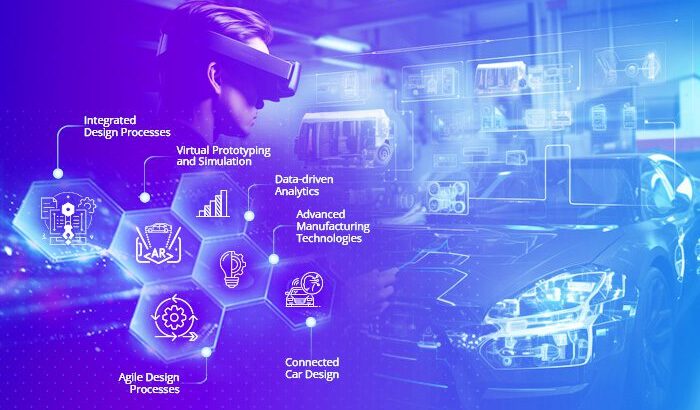
Digital Transformation in Auto Manufacturing: Role of AR Solutions!

The automotive industry has always been at the forefront of innovation, from the introduction of assembly lines to the adoption of robotics in production. Today, the next major shift in the industry is being driven by digital transformation-a change powered by smart technologies like the Internet of Things (IoT), Artificial Intelligence (AI), data analytics, and Augmented Reality (AR).

Among these, AR has emerged as one of the most impactful tools, blending the physical and digital worlds to enhance everything from design to production, training, and maintenance. Auto manufacturers around the world are increasingly realizing how AR can make their operations faster, safer, and more efficient.

Understanding AR in the Manufacturing Context

Augmented Reality (AR) overlays digital information-such as 3D models, diagrams, or data-on top of real-world objects through a smartphone, tablet, or AR headset. Unlike Virtual Reality (VR), which creates an entirely digital environment, AR enhances the physical environment with interactive digital elements.

In automotive manufacturing, this capability means that engineers, designers, and technicians can visualize, analyse, and modify complex machinery or vehicle components in real time, without needing physical prototypes or printed manuals. It’s a leap toward smarter, data-driven production lines.

1. Enhancing Product Design and Prototyping

Before a car hits the production floor, it goes through several design and testing phases. Traditionally, creating prototypes involved expensive materials and long development cycles. AR changes that by allowing designers to project 3D models of vehicles or components onto real-world surfaces, making it possible to test form, fit, and functionality virtually.

Teams can collaborate remotely, examine design flaws instantly, and make necessary adjustments without building multiple prototypes. This approach not only reduces costs but also accelerates innovation cycles, allowing automakers to bring new models to market faster.

2. Improving Production and Assembly Line Efficiency

AR is proving to be a game-changer on the factory floor. Assembly line workers can wear AR glasses or use tablets to receive step-by-step instructions projected directly onto the parts they’re working on. This eliminates the need for paper manuals and reduces human error significantly.

For example, if a technician is assembling an engine component, the AR system can highlight which bolt to tighten next, display torque specifications, or warn if a part is placed incorrectly. Such real-time visual guidance boosts productivity, ensures precision, and enhances worker safety-all critical elements in auto manufacturing.

3. Streamlining Maintenance and Quality Assurance

Machine downtime is a major issue in the automotive sector, where every minute lost translates into production delays and financial losses. AR solutions are helping maintenance teams minimize these disruptions. By using AR glasses, technicians can visualize the internal structure of complex machinery, identify faulty components, and follow guided repair procedures without dismantling entire systems unnecessarily.

Additionally, AR-driven quality assurance enables inspectors to overlay digital CAD models onto physical parts to detect deviations, misalignments, or defects in real time. This immediate feedback loop allows manufacturers to maintain stringent quality standards while reducing rework.

4. Transforming Workforce Training and Skill Development

The automotive industry is witnessing a skills gap as new technologies demand different capabilities from the workforce. AR-based training programs are bridging this gap effectively. Instead of relying on lengthy classroom sessions or trial-and-error learning on the production floor, new employees can use AR headsets to experience immersive, hands-on simulations.

Trainees can learn to assemble complex vehicle systems, understand safety procedures, or even practice troubleshooting-all in a risk-free virtual environment. This not only improves retention and confidence but also allows organizations to train large teams quickly and consistently.

5. Enabling Remote Assistance and Collaboration

Global auto manufacturers often operate across multiple plants and geographies. When an issue arises in one location, having an expert on-site can be time-consuming and expensive. AR enables remote collaboration, where specialists can see exactly what the on-site worker is viewing through their AR device and guide them in real time.

This real-time visual communication accelerates problem-solving, reduces travel costs, and keeps production lines running smoothly. It’s a vital component in maintaining agility in today’s globally connected manufacturing environment.

6. Data Integration and Predictive Insights

AR, when combined with IoT and AI, takes digital transformation to another level. For instance, AR interfaces can display live performance data from sensors installed on machines, helping operators identify potential issues before they escalate. Predictive maintenance powered by AR ensures that machines are serviced at optimal times, reducing downtime and extending their lifespan.

This seamless integration of AR with data analytics enables manufacturers to make informed, proactive decisions-shifting from reactive repairs to predictive management.

The Road Ahead for AR in Auto Manufacturing

The adoption of AR in auto manufacturing is still growing, but the benefits are already evident. From concept to customer delivery, AR is making processes more connected, intelligent, and efficient. As AR hardware becomes more affordable and software solutions more customizable, the barriers to entry are quickly diminishing.

Future innovations could include AI-driven AR assistants, real-time analytics dashboards, and fully integrated digital twins-allowing manufacturers to simulate, visualize, and optimize every stage of vehicle production in a unified digital ecosystem.

Conclusion

AR is no longer a futuristic concept-it’s a vital part of the digital transformation journey for the automotive industry. By merging the physical and digital worlds, AR is redefining how vehicles are designed, built, and maintained. Manufacturers who embrace this technology are not just improving operational efficiency but also building resilience, agility, and a stronger competitive edge in an evolving marketplace.

At Razorse Software, we help automotive companies accelerate their digital transformation by developing innovative AR-based and data-driven solutions that enhance productivity, efficiency, and business growth.


#DigitalTransformation #AugmentedReality #AutoManufacturing #ARSolutions #RazorseSoftware #Industry40 #SmartManufacturing #Innovation

How a CMS Impacts Your Website’s SEO and Ranking

When it comes to improving your website’s visibility on search engines, most people think about keywords, backlinks, or page speed. But one factor that often goes unnoticed is your Content Management System (CMS). The CMS you choose -and how you use it -plays a huge role in shaping how well your site ranks on Google.

Your CMS isn’t just a platform to upload and edit content. It influences everything from site structure and page speed to mobile optimization and metadata management. If your CMS is not SEO-friendly, even the best content strategy may struggle to perform.

Let’s understand how your CMS can make or break your SEO efforts, and what you can do to make the most of it.

1. Website Structure and URL Management

A clean, logical structure is the foundation of SEO. A good CMS helps you organize your pages and categories properly so that both users and search engines can navigate your website easily.

For example, a CMS that allows you to create SEO-friendly URLs (like /services/website-design instead of /index.php?id=123) gives search engines clear context about your pages. Most modern CMS platforms -such as WordPress, Drupal, or Joomla -offer custom URL structures and redirects that keep your site well-organized.

If your CMS doesn’t let you customize URLs or automatically generates long, unreadable links, it could confuse search engines and hurt rankings.

2. Page Speed and Performance

Google has made it clear -website speed directly affects SEO rankings. A CMS with too many plugins, unoptimized themes, or poor caching options can slow your site down drastically.

An optimized CMS, on the other hand, provides built-in tools for caching, minification, and image compression. Platforms like WordPress have plugins such as WP Rocket or LiteSpeed Cache that can enhance performance in just a few clicks.

Always remember: a faster site not only ranks higher but also keeps visitors engaged longer -which improves dwell time, another indirect ranking signal.

3. Mobile Optimization

In today’s world, mobile-first indexing is the norm. Google primarily evaluates the mobile version of your website to determine rankings. That’s why your CMS must support responsive design out of the box.

A mobile-friendly CMS automatically adjusts your site layout for different screen sizes and ensures images, buttons, and text remain accessible on smartphones and tablets. Many modern CMS platforms also offer AMP (Accelerated Mobile Pages) integration for faster mobile performance.

If your CMS doesn’t adapt well to mobile devices, it can negatively impact user experience and push your rankings down.

4. Metadata and On-Page SEO Control

Your CMS should allow easy editing of important SEO elements such as title tags, meta descriptions, image alt text, and header tags. These are crucial for communicating your content’s purpose to search engines.

The best CMS platforms give you full control over these fields without needing to code. For example, WordPress users can install plugins like Yoast SEO or Rank Math to manage on-page SEO effortlessly.

Having the flexibility to edit metadata at both page and post levels ensures your content is always optimized for the right keywords and topics.

5. Content Creation and Management

SEO thrives on consistent, high-quality content. A CMS makes it easier to publish, schedule, and update content regularly. With features like WYSIWYG editors, media libraries, and version control, content teams can collaborate smoothly without depending on developers.

Moreover, a CMS that supports structured content (using schema markup or custom fields) can help search engines better understand your data, improving chances of appearing in rich snippets or featured results.

In short, a CMS that simplifies content creation helps maintain an active, SEO-friendly website.

6. Security and Technical SEO

Security may not seem like an SEO factor at first glance, but it has a direct impact. Google prioritizes HTTPS-enabled, secure websites. If your CMS is outdated or lacks strong security plugins, your site becomes vulnerable to hacks and malware -which can lead to de-indexing or ranking penalties.

A strong CMS provides regular security updates, two-factor authentication, and SSL integration. It also supports XML sitemaps, canonical tags, and robots.txt customization, which are key technical SEO elements.

When your CMS handles these technical aspects efficiently, your site remains both safe and search-friendly.

7. Integration with SEO Tools and Analytics

Modern SEO requires data-driven insights. A CMS that integrates smoothly with tools like Google Analytics, Google Search Console, and schema generators helps you track performance and make informed improvements.

You should be able to view analytics dashboards, keyword performance, and crawl reports directly from your CMS or through connected plugins. This integration ensures your SEO team can identify issues quickly and fine-tune your strategy without switching platforms repeatedly.

8. Scalability and Growth

As your business grows, your CMS should grow with you. Adding new service pages, blog sections, or landing pages shouldn’t compromise performance or SEO.

A scalable CMS supports modular design, database optimization, and content caching, allowing your site to handle higher traffic without downtime. This flexibility ensures your SEO rankings remain stable even as you expand your digital footprint.

Conclusion

Your CMS does far more than just manage content -it shapes how search engines perceive your website. From site speed and mobile responsiveness to structured data and technical SEO, every element depends on how well your CMS is configured.

At Razorse Software, we help businesses build SEO-friendly websites with powerful CMS solutions that drive traffic, engagement, and rankings. Our development approach focuses on speed, scalability, and search performance -ensuring your brand stands out on every platform.

#RazorseSoftware #CMSDevelopment #SEO #DigitalMarketing #WebsiteOptimization #SearchRankings

How to Optimize CMS Performance for High-Traffic Websites

A website that loads slowly can instantly turn away visitors, hurt conversions, and even impact search rankings. When traffic scales up -whether from marketing campaigns, seasonal spikes, or business growth -even small inefficiencies in your CMS (Content Management System) can lead to sluggish performance. Optimizing your CMS for high-traffic websites ensures stability, speed, and scalability -the three key ingredients of a seamless digital experience.

Here are some practical ways to improve your CMS performance and keep your website running smoothly, even when the traffic shoots up. 

1. Choose the Right Hosting Environment

Your CMS is only as good as the server it runs on. Shared hosting might be affordable but often lacks the resources to handle large traffic surges. Instead, consider:

  • Dedicated or VPS Hosting: Offers isolated resources that guarantee performance.
  • Cloud Hosting (AWS, Azure, GCP): Enables auto-scaling so your site adapts to sudden spikes in visitors.
  • CDN Integration: A Content Delivery Network distributes your content across multiple servers worldwide, reducing latency and improving global load times.

For high-traffic sites, pairing your CMS with a cloud-based, load-balanced hosting infrastructure is the most efficient solution.

2. Enable Caching at Every Level

Caching is the backbone of high-performance CMS systems. It minimizes the need to regenerate content dynamically for every request. There are multiple layers of caching you can implement:

  • Page Caching: Saves entire HTML pages, making them instantly available for repeat visitors.
  • Object Caching: Stores frequently used database queries or code objects in memory.
  • Browser Caching: Allows users’ browsers to store static assets (like CSS, JS, and images), reducing repeat load times.

CMS platforms like WordPress, Drupal, and Joomla offer excellent caching plugins or modules (like WP Super Cache, W3 Total Cache, or Varnish integration) that can be configured easily.

3. Optimize Your Database

As your website scales, the database can become a bottleneck if not maintained properly. Here are some ways to keep it lean and fast:

  • Regular Cleanup: Remove old revisions, spam comments, and unused metadata.
  • Indexing: Ensure frequently queried columns are properly indexed for faster lookup.
  • Use a Separate Database Server: For large-scale sites, isolating the database improves both security and performance.
  • Query Optimization: Analyze slow queries using tools like MySQL’s slow query log and optimize them for efficiency.

Databases that are well-structured and regularly maintained can handle millions of requests without choking under pressure.

4. Compress and Optimize Media Files

Heavy images and videos are among the biggest culprits of slow load times. To fix this:

  • Compress images using tools like TinyPNG or CMS plugins that automate compression.
  • Use next-gen image formats like WebP for superior compression without quality loss.
  • Implement lazy loading so images load only when a user scrolls to them.
  • Host large video files on external platforms (like YouTube or Vimeo) and embed them rather than hosting locally.

Optimized media can dramatically improve load times without compromising the visual appeal of your site.

5. Use a Content Delivery Network (CDN)

A CDN caches your static assets (HTML, CSS, JavaScript, images, etc.) across multiple servers worldwide. When a user visits your website, the content is served from the closest geographical location -cutting down on latency.

Popular CDNs like Cloudflare, Akamai, or Amazon CloudFront also protect against DDoS attacks and provide performance analytics. Integrating a CDN with your CMS ensures your website performs consistently, regardless of where your visitors come from.

6. Minify CSS, JavaScript, and HTML

Every extra space, comment, or line in your code adds to file size. By minifying these files, you reduce load time significantly:

  • Combine multiple CSS and JS files into single bundles.
  • Use CMS plugins (like Autoptimize or Fast Velocity Minify) to automate this process.
  • Defer non-essential JavaScript to prevent it from blocking page rendering.

This simple optimization step can shave precious milliseconds off your page load speed -which can make a big difference for users on slower connections.

7. Implement Load Balancing

High-traffic websites often face uneven distribution of requests. Load balancers help by distributing incoming requests evenly across multiple servers.
This not only ensures that no single server gets overwhelmed but also provides redundancy -if one server fails, another picks up automatically.
Cloud platforms make it easy to implement load balancing with minimal configuration and maximum uptime.

8. Monitor Performance Continuously

Optimizing once isn’t enough. Continuous monitoring helps detect new bottlenecks as your site evolves.
Use tools like:

  • Google PageSpeed Insights for page-level recommendations.
  • GTmetrix or Pingdom for detailed performance reports.
  • New Relic or Datadog for server-level and application performance monitoring.

Tracking these metrics ensures you can address issues proactively before they affect user experience.

9. Update Regularly but Cautiously

CMS updates often include performance and security improvements, so keeping your system and plugins up to date is vital. However, major updates can occasionally cause compatibility issues.
Always test updates in a staging environment before applying them to the live site. This balance between innovation and stability is crucial for high-traffic sites.

10. Optimize Your CMS Theme and Plugins

Not all themes and plugins are built with performance in mind. A bloated theme or outdated plugin can slow down the entire site.

  • Use lightweight themes that focus on speed and efficiency.
  • Deactivate and delete any plugins not in use.
  • Choose plugins from trusted developers that are updated regularly.

Every plugin you add introduces code that affects loading time -so quality always beats quantity.

Conclusion

A high-performing CMS isn’t built overnight. It’s the result of ongoing optimization, testing, and tuning. By combining the right hosting environment, caching, CDN, optimized media, and smart coding practices, your website can deliver a seamless experience even during massive traffic surges.

At Razorse Software, we specialize in developing high-performance, scalable, and SEO-optimized CMS solutions that help brands handle traffic spikes effortlessly. Whether you’re running a corporate portal or a large e-commerce platform, our team ensures your digital experience stays fast, reliable, and secure -every time.

#RazorseSoftware #CMSOptimization #WebsitePerformance #WebDevelopment #DigitalTransformation

How a VMS Enhances Security and Compliance for Businesses

In today’s fast-changing digital and physical business environment, ensuring security and compliance is not just an option-it’s a necessity. Organizations of all sizes deal with constant risks, whether it’s unauthorized access to premises, mishandling of sensitive data, or failing to meet regulatory requirements. One effective solution that has emerged to address these challenges is a Visitor Management System (VMS).

A VMS goes beyond the traditional sign-in sheet or reception logbook. It integrates technology, security protocols, and compliance requirements to provide a seamless way of tracking, managing, and securing visitors, contractors, and employees. By digitizing and automating visitor processes, businesses not only strengthen security but also reduce operational inefficiencies while ensuring adherence to regulatory standards.

Strengthening On-Site Security

The first and most visible advantage of a Visitor Management System is improved security. Traditional visitor logs are prone to errors, manipulation, and unauthorized access. A VMS eliminates these weaknesses by digitizing the entire visitor lifecycle-from pre-registration to check-in and check-out.

  • Identity Verification: Visitors can be required to submit government IDs, QR codes, or biometric verification, ensuring only authorized individuals enter the premises.
  • Real-Time Monitoring: Security teams can track who is inside the building at any given time, along with their purpose and location.
  • Access Control Integration: A modern VMS can be connected to access control systems, restricting visitor movement to specific zones. For instance, contractors can be limited to work areas without access to sensitive offices or data centers.

By making entry points more controlled and transparent, a VMS greatly reduces the chances of security breaches.

Ensuring Regulatory Compliance

Regulatory requirements in industries such as healthcare, finance, and IT have become stricter than ever. From GDPR and HIPAA to ISO and PCI-DSS, organizations must demonstrate that they have adequate processes for tracking access and maintaining records. A VMS simplifies this.

  • Automated Audit Trails: The system maintains digital logs of every visitor, complete with timestamps, entry points, and duration of stay. These records can be easily retrieved during audits.
  • Data Privacy Controls: Unlike paper logs, where personal details are visible to everyone, a VMS protects sensitive data with encryption and access permissions.
  • Compliance Workflows: Customized workflows allow businesses to enforce compliance rules, such as signing NDAs, watching safety videos, or agreeing to security protocols before entry.

This not only reduces the risk of penalties for non-compliance but also builds trust among stakeholders and clients who expect organizations to handle sensitive data responsibly.

Enhancing Operational Efficiency

Security and compliance shouldn’t come at the cost of productivity. A Visitor Management System strikes the right balance by making processes faster and smarter.

  • Pre-Registration: Guests can be pre-registered, receiving QR codes or digital passes that allow quick entry without long wait times.
  • Instant Notifications: Hosts are automatically notified when their visitors arrive, ensuring a smooth and professional experience.
  • Centralized Dashboard: Admins and security staff can manage all visitor data from one centralized platform, reducing manual workloads and errors.

In this way, organizations not only improve their security posture but also deliver a better experience for employees, contractors, and clients.

Building Trust with Clients and Employees

In an age where security incidents often make headlines, businesses need to show that they take security and compliance seriously. A VMS plays an important role in building that confidence. Employees feel safer knowing that unauthorized individuals cannot roam freely around their workplace. Clients and partners see that the business is committed to maintaining the highest security and compliance standards, which improves reputation and reliability.

Integration with Emerging Technologies

Modern VMS platforms are no longer standalone tools. They can integrate with other enterprise systems to create a holistic security and compliance ecosystem.

  • IoT and Smart Devices: Integration with surveillance cameras, access control systems, and smart locks enhances visibility and control.
  • Cloud and Remote Management: Cloud-based VMS allows multi-location organizations to manage visitors across different sites with ease.
  • Analytics and Reporting: Advanced reporting features provide insights into visitor patterns, helping in both compliance audits and security planning.

By leveraging these integrations, organizations can future-proof their security strategy.

Long-Term Value of a VMS

While businesses may initially adopt a Visitor Management System for compliance purposes, the long-term value extends much further. It enables:

  • Stronger resilience against security threats
  • Improved compliance posture during audits
  • Enhanced operational workflows
  • Greater trust among employees, clients, and regulators

In short, a VMS is not just a tool for visitor tracking-it’s a strategic investment in security, compliance, and overall business growth.

Conclusion

In today’s business landscape, where both physical and digital security are under constant scrutiny, a Visitor Management System acts as a strong line of defense while ensuring compliance with regulatory frameworks. From securing sensitive areas and protecting data to maintaining audit-ready visitor logs, a VMS helps businesses stay safe, efficient, and future-ready.

At Razorse Software, we believe in enabling organizations with smart, secure, and scalable digital solutions. A VMS is a key example of how technology can simplify complex challenges while building trust and compliance. Businesses that adopt such systems today will not only protect their assets but also gain a competitive edge tomorrow.

#VisitorManagement #BusinessSecurity #Compliance #RazorseSoftware #DigitalTransformation